STM32CubeIDE
Integrated Development Environment
Install
Unzip the file.
On linux:
chmod 777 *
st-stm32cubeide_1.17.0_23558_20241125_2245_amd64.sh
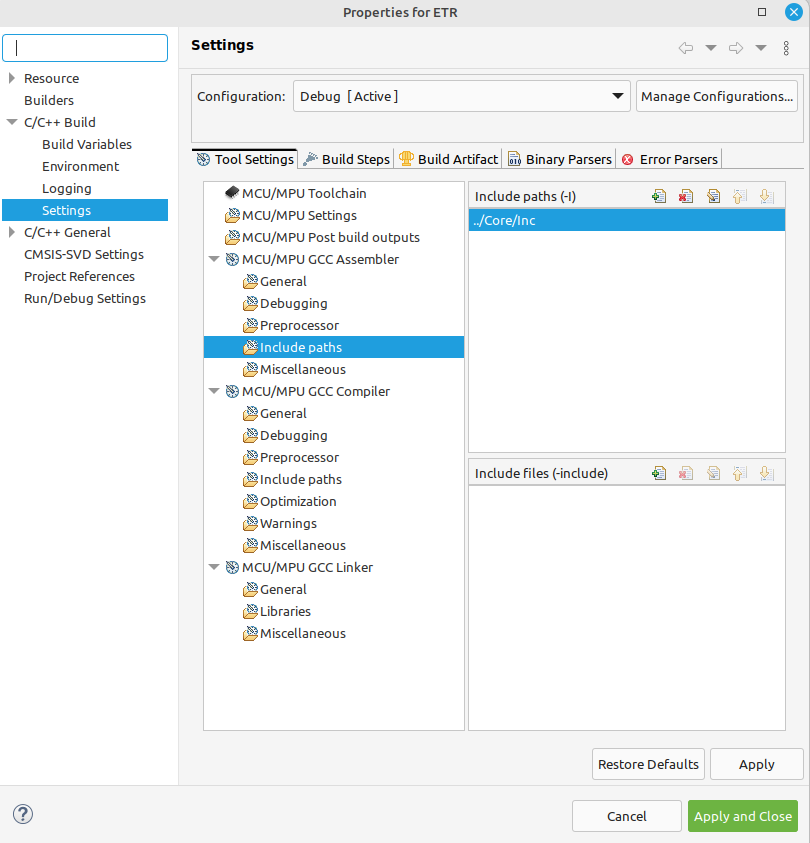
Assembler - include files
HAL
Suppress this file:

Configuration
If you build a project and face warnings like these:
in function `_close_r’:
(.text._close_r+0xc): warning: _close is not implemented and will always fail
in function `_lseek_r’:
(.text._lseek_r+0x10): warning: _lseek is not implemented and will always fail
in function `_read_r’:
(.text._read_r+0x10): warning: _read is not implemented and will always fail
in function `_write_r’:
(.text._write_r+0x10): warning: _write is not implemented and will always fail
_close_r’ `_lseek_r’ `_read_r’ `_write_r’
Solution

Check “Do not use standard start files”
Check “Do not use default libraries”
Check “No startup or default libraries”
options -> -nostartfiles -nodefaultlibs -nostdlib
Zoom in, zoom out
Zoom in: Ctrl + Use the + on the = key, not the keypad +!
Zoom out: Ctrl -, do no use keypad
linker: use your own .ld file
In Linker Script, you can use the Browse button:

 ENTRY(Reset_Handler)

 MEMORY
 {
   FLASH (rx)   : ORIGIN = 0x08000000, LENGTH = 1024K
 SRAM  (rwx)  : ORIGIN = 0x20000000, LENGTH = 96K
 SRAM2 (rwx)  : ORIGIN = 0x10000000, LENGTH = 32K
 }


 SECTIONS {
  .text : {
    *.o(.text)    /* fhc.o(.text) */
    *(.rodata*)
     } >FLASH

 .data :  {
      *.o(.data)
     } >SRAM AT> FLASH
 }
make: use your own makefile file
remains to be done
import project

location of STM32CubeIDE toolchain
The toolchain is located in the STM32CubeIDE installation folder under the ‘plugins’ directory.

/home/fhc/st/stm32cubeide_1.17.0/plugins/com.st.stm32cube.ide.mcu.externaltools.gnu-tools-for-stm32.12.3.rel1.linux64_1.1.0.202410170702/tools/bin
/home/fhc/st/stm32cubeide_1.17.0/plugins/com.st.stm32cube.ide.mcu.externaltools.gnu-tools-for-stm32.12.3.rel1.linux64_1.1.0.202410170702/tools/bin
ln -s /home/fhc/st/stm32cubeide_1.17.0/plugins/com.st.stm32cube.ide.mcu.externaltools.gnu-tools-for-stm32.12.3.rel1.linux64_1.1.0.202410170702/tools/bin /home/fhc/tool
Make a symlink in your local directory
ln -s /very/long/path ~/foo
You can now do cd foo
It will take you to /very/long/path.
$ ls -l tools total 4 lrwxrwxrwx 1 fhc fhc 146 Nov 28 21:55 bin -> /home/fhc/st/stm32cubeide_1.17.0/plugins/com.st.stm32cube.ide.mcu.externaltools.gnu-tools-for-stm32.12.3.rel1.linux64_1.1.0.202410170702/tools/bin
Use cd -P foo to display /very/long/path
echo $PATH /home/fhc/.local/bin: /usr/local/sbin: /usr/local/bin: /usr/sbin:/usr/bin:/sbin:/bin:/usr/games: /usr/local/games: /snap/bin: /home/fhc/TOOLCHAIN/bin: /home/fhc/.local/bin:/usr/local/sbin:/usr/local/bin:/usr/sbin:/usr/bin:/sbin:/bin:/usr/games:/usr/local/games:/snap/bin
Locked Workspace
“Please choose another workspace as <current workspace> is currently in use.
Delete the .lock file in the .metadata directory in your workspace directory.
STM32CubeIDE gcc
AS
-mcpu=cortex-m4 -g3 -DDEBUG -c -I../Core/Inc -x assembler-with-cpp –specs=nano.specs -mfpu=fpv4-sp-d16 -mfloat-abi=hard -mthumb
C
-mcpu=cortex-m4 -std=gnu11 -g3 -DDEBUG -DUSE_HAL_DRIVER -DSTM32L476xx -c -I../Core/Inc -I../Drivers/STM32L4xx_HAL_Driver/Inc -I../Drivers/STM32L4xx_HAL_Driver/Inc/Legacy -I../Drivers/CMSIS/Device/ST/STM32L4xx/Include -I../Drivers/CMSIS/Include -O0 -ffunction-sections -fdata-sections -Wall -fstack-usage -fcyclomatic-complexity –specs=nano.specs -mfpu=fpv4-sp-d16 -mfloat-abi=hard -mthumb
LINKER -mcpu=cortex-m4 -T”/home/fhc/STM32CubeIDE/workspace_1.17.0/xx/STM32L476RGTX_FLASH.ld” –specs=nosys.specs -nostartfiles -nodefaultlibs -nostdlib -static -nodefaultlibs –specs=nano.specs -mfpu=fpv4-sp-d16 -mfloat-abi=hard -mthumb
Construct a project
File→New→Project.
In the New Project dialog, select C Project in C/C++.

Give a project name and choose Empty Project and MCU ARM GCC.


Choose STM32 target:

Install STM32CubeMonitor
In case you have the following error:
$ sudo apt install stm32cubemonitor_1.9.0_amd64.deb
Reading package lists... Done
Building dependency tree... Done
Reading state information... Done

E: The package stm32cubemonitor needs to be reinstalled, but I can't find an archive for it.
do the following:
 $ sudo mv /var/lib/dpkg/status ~/status.bak
 $ sudo cp /var/backups/dpkg.status.0 /var/lib/dpkg/status
 $ sudo apt-get update
Configure STM32CubeMonitor
Double click on the myProbe_Out node:

Click on the + button (Add New Probe Config Node):


Modify the protocol and frequency if need be:

Validate by clicking on “Add”, then on “Done”.
You can make the ST link blink by pressing the LED button.
Click on DEPLOY -> Successfully deployed
Configure variables
“Variables” node